
Docker
In the docker-compose.yml file create an images/php image
importer:
    build: images/php
    ports:
        - 80:80
    volumes:
        - ../..:/var/www
find your IP address (ifconfig / ipconfig), in my example (10.1.0.133)
Create a Dockerfile in the images/php folder
FROM php:7.0.1-apache

RUN yes | pecl install -o -f xdebug \
    && rm -rf /tmp/pear \
    && echo "zend_extension=/usr/local/lib/php/extensions/no-debug-non-zts-20151012/xdebug.so" > /usr/local/etc/php/conf.d/xdebug.ini \
    && echo "xdebug.remote_enable=on" >> /usr/local/etc/php/conf.d/xdebug.ini \
    && echo "xdebug.remote_host=10.1.0.133" >> /usr/local/etc/php/conf.d/xdebug.ini \
    && echo "xdebug.remote_connect_back=On" >> /usr/local/etc/php/conf.d/xdebug.ini \
    && echo "memory_limit = 64M" > /usr/local/etc/php/conf.d/php.ini \
    && echo "xdebug.remote_autostart = 1" >> /usr/local/etc/php/conf.d/xdebug.ini
Once this is done, restart your docker-machine
PhpStorm
In my example, my machine is at IP address: 192.168.99.100
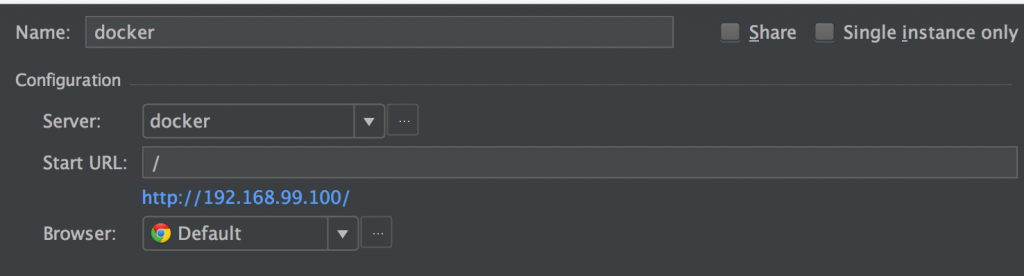
Server configuration

Now PhpStorm will receive the information, and it is possible to debug
Console
If you use the command line, don’t forget to use the variable
Windows:
set PHP_IDE_CONFIG="serverName=docker"
Linux / Mac OS X:
export PHP_IDE_CONFIG="serverName=docker"