
Préparation
Pour commencer nous avons besoin d’une entité Product ainsi que d’une entité ProductImage qui contiendra le nom des images.
Pour ce faire, nous utilisons la commande dans notre terminal
php bin/console make:entitynamespace App\Entity;
use Doctrine\Common\Collections\ArrayCollection;
use Doctrine\Common\Collections\Collection;
use Doctrine\ORM\Mapping as ORM;
/**
* @ORM\Entity(repositoryClass="App\Repository\ProductRepository")
*/
class Product
{
/**
* @ORM\Id()
* @ORM\GeneratedValue()
* @ORM\Column(type="integer")
*/
private $id;
/**
* @ORM\Column(type="string", length=255)
*/
private $name;
/**
* @ORM\OneToMany(targetEntity="App\Entity\ProductImage", mappedBy="product")
*/
private $productImages;
public function __construct()
{
$this->productImages = new ArrayCollection();
}
public function getId(): ?int
{
return $this->id;
}
public function getName(): ?string
{
return $this->name;
}
public function setName(string $name): self
{
$this->name = $name;
return $this;
}
/**
* @return Collection|ProductImage[]
*/
public function getProductImages(): Collection
{
return $this->productImages;
}
public function addProductImage(ProductImage $productImage): self
{
if (!$this->productImages->contains($productImage)) {
$this->productImages[] = $productImage;
$productImage->setProduct($this);
}
return $this;
}
public function removeProductImage(ProductImage $productImage): self
{
if ($this->productImages->contains($productImage)) {
$this->productImages->removeElement($productImage);
// set the owning side to null (unless already changed)
if ($productImage->getProduct() === $this) {
$productImage->setProduct(null);
}
}
return $this;
}
}
namespace App\Entity;

use Doctrine\ORM\Mapping as ORM;

/**
 * @ORM\Entity(repositoryClass="App\Repository\ProductImageRepository")
 */
class ProductImage
{
    /**
     * @ORM\Id()
     * @ORM\GeneratedValue()
     * @ORM\Column(type="integer")
     */
    private $id;

    /**
     * @ORM\ManyToOne(targetEntity="App\Entity\Product", inversedBy="productImages")
     */
    private $product;

    /**
     * @ORM\Column(type="string", length=255)
     */
    private $image_name;

    /**
     * @ORM\Column(type="string", length=255, nullable=true)
     */
    private $image_size;

    public function getId(): ?int
    {
        return $this->id;
    }

    public function getProduct(): ?Product
    {
        return $this->product;
    }

    public function setProduct(?Product $product): self
    {
        $this->product = $product;

        return $this;
    }

    public function getImageName(): ?string
    {
        return $this->image_name;
    }

    public function setImageName(string $image_name): self
    {
        $this->image_name = $image_name;

        return $this;
    }

    public function getImageSize(): ?string
    {
        return $this->image_size;
    }

    public function setImageSize(?string $image_size): self
    {
        $this->image_size = $image_size;

        return $this;
    }
}
Configuration de VichUploaderBundle
Comme indiqué dans la documentation de Symfony 4, nous allons utiliser le bundle VichUploaderBundle
composer require vich/uploader-bundleEnsuite ajouter le fichier de configuration « config/packages/vich_uploader.yaml » nécessaire
# config/packages/vich_uploader.yaml or app/config/config.yml
vich_uploader:
    db_driver: orm # or mongodb or propel or phpcr
Une fois que cela est fait, le bundle est prêt à être utilisé. Pour commencer, il faut modifier l’entité ProductImage et ajouter « @VichUploadable » avant la déclaration de la classe.
...

/**
 * @ORM\Entity(repositoryClass="App\Repository\ProductImageRepository")
 * @Vich\Uploadable
 */
class ProductImage
{
...
Ensuite ajouter ces propriétés.
    /**
     * NOTE: This is not a mapped field of entity metadata, just a simple property.
     *
     * @Vich\UploadableField(mapping="product_image", fileNameProperty="imageName", size="imageSize")
     *
     * @var File
     */
    private $imageFile;

    /**
     * @ORM\Column(type="datetime")
     *
     * @var DateTime
     */
    private $updatedAt;
Puis ces méthodes
/**
     * If manually uploading a file (i.e. not using Symfony Form) ensure an instance
     * of 'UploadedFile' is injected into this setter to trigger the update. If this
     * bundle's configuration parameter 'inject_on_load' is set to 'true' this setter
     * must be able to accept an instance of 'File' as the bundle will inject one here
     * during Doctrine hydration.
     *
     * @param File|Symfony\Component\HttpFoundation\File\UploadedFile $imageFile
     */
    public function setImageFile(?File $imageFile = null): void
    {
        $this->imageFile = $imageFile;

        if (null !== $imageFile) {
            // It is required that at least one field changes if you are using doctrine
            // otherwise the event listeners won't be called and the file is lost
            $this->updatedAt = new DateTimeImmutable();
        }
    }

    public function getImageFile(): ?File
    {
        return $this->imageFile;
    }
L’entité ProductImage ressemble donc à cela
<?php

namespace App\Entity;

use DateTimeImmutable;
use Doctrine\ORM\Mapping as ORM;
use Symfony\Component\HttpFoundation\File\File;
use Vich\UploaderBundle\Mapping\Annotation as Vich;

/**
 * @ORM\Entity(repositoryClass="App\Repository\ProductImageRepository")
 * @Vich\Uploadable
 */
class ProductImage
{
    /**
     * @ORM\Id()
     * @ORM\GeneratedValue()
     * @ORM\Column(type="integer")
     */
    private $id;

    /**
     * @ORM\ManyToOne(targetEntity="App\Entity\Product", inversedBy="productImages")
     */
    private $product;

    /**
     * @ORM\Column(type="string", length=255)
     */
    private $image_name;

    /**
     * @ORM\Column(type="string", length=255, nullable=true)
     */
    private $image_size;

    /**
     * NOTE: This is not a mapped field of entity metadata, just a simple property.
     *
     * @Vich\UploadableField(mapping="product_image", fileNameProperty="imageName", size="imageSize")
     *
     * @var File
     */
    private $imageFile;

    /**
     * @ORM\Column(type="datetime")
     *
     * @var DateTime
     */
    private $updatedAt;

    public function getId(): ?int
    {
        return $this->id;
    }

    public function getProduct(): ?Product
    {
        return $this->product;
    }

    public function setProduct(?Product $product): self
    {
        $this->product = $product;

        return $this;
    }

    public function getImageName(): ?string
    {
        return $this->image_name;
    }

    public function setImageName(string $image_name): self
    {
        $this->image_name = $image_name;

        return $this;
    }

    public function getImageSize(): ?string
    {
        return $this->image_size;
    }

    public function setImageSize(?string $image_size): self
    {
        $this->image_size = $image_size;

        return $this;
    }

    /**
     * If manually uploading a file (i.e. not using Symfony Form) ensure an instance
     * of 'UploadedFile' is injected into this setter to trigger the update. If this
     * bundle's configuration parameter 'inject_on_load' is set to 'true' this setter
     * must be able to accept an instance of 'File' as the bundle will inject one here
     * during Doctrine hydration.
     *
     * @param File|Symfony\Component\HttpFoundation\File\UploadedFile $imageFile
     * @throws Exception
     */
    public function setImageFile(?File $imageFile = null): void
    {
        $this->imageFile = $imageFile;

        if (null !== $imageFile) {
            // It is required that at least one field changes if you are using doctrine
            // otherwise the event listeners won't be called and the file is lost
            $this->updatedAt = new DateTimeImmutable();
        }
    }

    public function getImageFile(): ?File
    {
        return $this->imageFile;
    }
}
Pour faciliter le tout, la fonction make:crud sera utilisée, pour ne pas avoir à créer le formulaire de toutes pièces
php bin/console make:crud ProductUne fois cela fait, il est encore nécessaire d’avoir un ProductImageType
<?php
namespace App\Form;

use App\Entity\ProductImage;
use Symfony\Component\Form\AbstractType;
use Symfony\Component\Form\FormBuilderInterface;
use Symfony\Component\OptionsResolver\OptionsResolver;
use Vich\UploaderBundle\Form\Type\VichImageType;

class ProductImageType extends AbstractType
{
    public function buildForm(FormBuilderInterface $builder, array $options)
    {
        $builder
            ->add('imageFile',VichImageType::class, [
                'required' => false,
                'download_uri' => true,
                'image_uri' => true
            ]);
        ;
    }

    public function configureOptions(OptionsResolver $resolver)
    {
        $resolver->setDefaults([
            'data_class' => ProductImage::class,
        ]);
    }
}
Ensuite dans le ProductType il est nécessaire d’ajouter la collection de productImages
...
    public function buildForm(FormBuilderInterface $builder, array $options)
    {
        $builder
            ->add('name')
            ->add('product_images', CollectionType::class, [
                'entry_type' => ProductImageType::class,
                'allow_add' => true,
                'allow_delete' => true,
                'prototype' => true
            ])
        ;
    }
...
Templating
Une fois cela fait, le formulaire affiche bien les images, mais il n’est pas possible d’ajouter une image
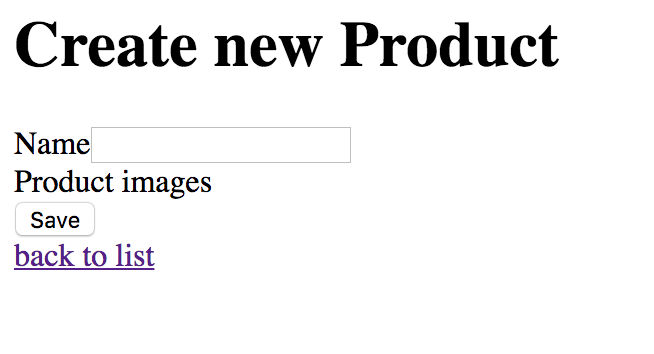
Il est donc temps d’ajouter ce bouton. Pour ce faire, il faut créer un form template: « _form_theme.html.twig«
{% block _product_product_images_widget %}
    <ul id="product-images-fields-list"
        data-prototype="{{ form_widget(prototype)|e }}"
        data-widget-tags="{{ '<li></li>'|e }}"
        data-widget-counter="{{ value|length }}"
    >
        {% for key,productImageForm in form.children %}
            {{ form_widget(productImageForm) }}

        {% endfor %}
    </ul>

    <button type="button"
            class="add-another-collection-widget"
            data-list-selector="#product-images-fields-list">Add another Product Image</button>
{% endblock %}
Puis modifions le _form.html.twig du product pour rajouter celui-ci
{% form_theme form 'product/_form_theme.html.twig' %}
{{ form_start(form) }}
    {{ form_widget(form) }}
    <button class="btn btn-info btn-sm">{{ button_label|default('Save') }}</button>
{{ form_end(form) }}
Il est maintenant temps de créer le javascript qui ajoute les images
    $('.add-another-collection-widget').click(function (e) {
        var list = $($(this).attr('data-list-selector'));
        // Try to find the counter of the list or use the length of the list
        var counter = list.data('widget-counter') | list.children().length;

        // grab the prototype template
        var newWidget = list.attr('data-prototype');
        // replace the "__name__" used in the id and name of the prototype
        // with a number that's unique to your emails
        // end name attribute looks like name="contact[emails][2]"
        newWidget = newWidget.replace(/__name__/g, counter);
        // Increase the counter
        counter++;
        // And store it, the length cannot be used if deleting widgets is allowed
        list.data('widget-counter', counter);

        // create a new list element and add it to the list
        var newElem = $(list.attr('data-widget-tags')).html(newWidget);
        newElem.appendTo(list);
    });
Une fois cela fait, en cliquant sur le bouton, un nouveau champ apparaît avec la possibilité d’ajouter une image
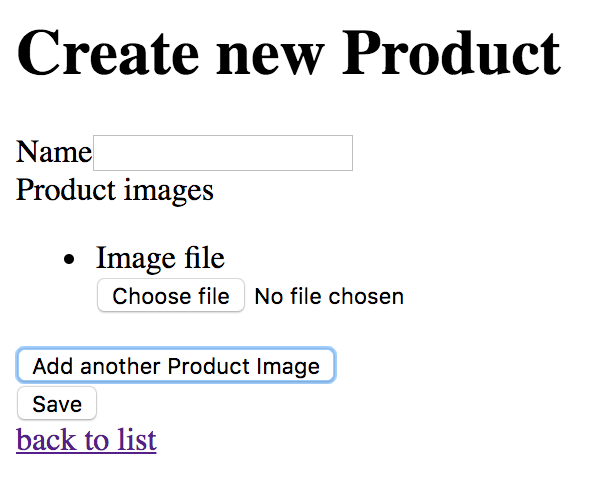
Une fois cela fait, il faut encore configurer le bundle pour indiquer où les images seront enregistrées dans le fichier « config/packages/vich_uploader.yaml »
    mappings:
        product_image:
            uri_prefix: /images/products
            upload_destination: '%kernel.project_dir%/public/images/products'
            inject_on_load: false
            delete_on_update: true
            delete_on_remove: true
            namer: Vich\UploaderBundle\Naming\UniqidNamer
Malheureusement un bug existe actuellement et si l’on reste ainsi, le productImage sera enregistré dans la référence au product. C’est pourquoi le controller doit être modifié pour les méthodes « new » et « edit »
    /**
     * @Route("/new", name="product_new", methods={"GET","POST"})
     */
    public function new(Request $request): Response
    {
        $product = new Product();
        $form = $this->createForm(ProductType::class, $product);
        $form->handleRequest($request);

        if ($form->isSubmitted() && $form->isValid()) {
            $productImages = $product->getProductImages();
            foreach($productImages as $key => $productImage){
                $productImage->setProduct($product);
                $productImages->set($key,$productImage);
            }

            $entityManager = $this->getDoctrine()->getManager();
            $entityManager->persist($product);
            $entityManager->flush();

            return $this->redirectToRoute('product_index');
        }

        return $this->render('product/new.html.twig', [
            'product' => $product,
            'form' => $form->createView(),
        ]);
    }

    /**
     * @Route("/{id}/edit", name="product_edit", methods={"GET","POST"})
     */
    public function edit(Request $request, Product $product): Response
    {
        $form = $this->createForm(ProductType::class, $product);
        $form->handleRequest($request);

        if ($form->isSubmitted() && $form->isValid()) {
            $productImages = $product->getProductImages();
            foreach($productImages as $key => $productImage){
                $productImage->setProduct($product);
                $productImages->set($key,$productImage);
            }

            $entityManager = $this->getDoctrine()->getManager();
            $entityManager->persist($product);
            $entityManager->flush();

            return $this->redirectToRoute('product_index', [
                'id' => $product->getId(),
            ]);
        }

        return $this->render('product/edit.html.twig', [
            'product' => $product,
            'form' => $form->createView(),
        ]);
    }